Opera VPN: Is the Free Browser VPN a Real VPN? (vs Opera VPN Pro)
Opera's free VPN is not a VPN in the usual sense: it protects only traffic from the Opera browser, sending it through an encrypted tunnel to Opera's servers, while every other app on your device keeps using your normal connection. Within that limit it is a decent free tool, with no data cap, no ads and no sign-up. Opera VPN Pro, the paid add-on at $48 a year, is a whole-device VPN, but only on Android and desktop computers that also run the Opera browser.
Use the free one for occasional private browsing in Opera. If you want your whole computer or phone covered for free, a desktop or mobile VPN app such as Proton VPN Free does more. Every detail below was read from Opera's own pages, its privacy statement and its US annual report on 9 October 2026.
Is Opera VPN a real VPN? (No, and here is what it is)
A VPN, in everyday use, means an app that sends all of a device's traffic through an encrypted tunnel to the provider's server. Opera's free feature does that for one app: the Opera browser. Opera describes it as "an encrypted AES-256 tunnel between the browser and Opera's physical servers". Websites you visit in Opera see the address of Opera's server, not yours.
Everything else on the device is outside the tunnel. A mail app, a game launcher, a torrent client, Windows or macOS updates and other browsers all connect as normal, with your real IP address visible. Many reviewers call it a browser proxy for that reason. Opera's own pages do not use that word, and it is our description rather than Opera's: an encrypted proxy built into the browser.
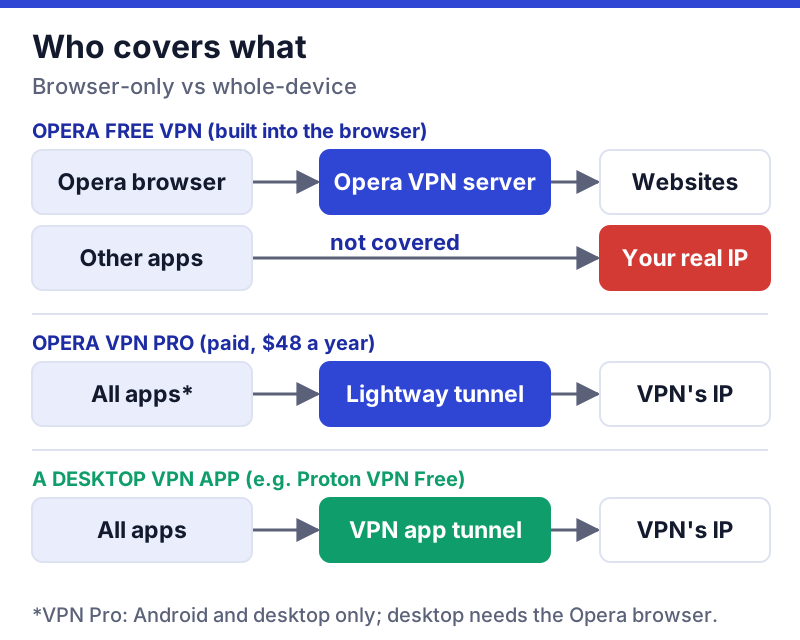
What the free browser VPN encrypts, and what it leaves out
Here is what you get, according to Opera's feature page and help centre:
- Coverage: Opera browser traffic only, on Windows, macOS, Linux, iOS and Android.
- Encryption: AES-256 between the browser and Opera's servers. Opera does not name the protocol.
- Locations: three, in the US, Singapore and the Netherlands; the help centre labels them Americas, Asia and Europe. By default Opera picks an "optimal location" for you.
- Limits: no data cap, no ads, and no account, email or password needed.
What it leaves out matters as much. There is no kill switch for the rest of the device, because the rest of the device is not in the tunnel. There are only three locations, so it is not a tool for reaching a particular country's services. And one default deserves a look: a setting called "Bypass VPN for default search engines" lets your default search engine see your real location so results stay local, over an https connection, and the VPN resumes when you open a web page. Opera's help centre says this option is not supported in Private Mode. If you want searches to go through the VPN too, switch it off under Settings, then Advanced, then Privacy & security.
To turn the free VPN on in desktop Opera, go to Settings, then Advanced, then Privacy & security, and click Enable VPN. A VPN button then appears at the left of the address bar, where you switch it on and pick a region.
Opera VPN Pro: the paid, device-wide version
Opera VPN Pro is a separate subscription that covers the whole device. Opera's page says it protects "all applications, games, and file sharing" and runs on the Lightway protocol (built with wolfSSL, per Opera's page) across about 48 locations and more than 3,000 servers in over 30 countries.
| Term | Price | Billed |
|---|---|---|
| 1 year | $4/month | $48 every year |
| 6 months | $5/month | $30 every six months |
| 1 month | $8/month | $8 monthly |
The limits are specific. VPN Pro covers up to six devices, Android phones and desktop computers only; Opera's page does not list iPhone or iPad. On a desktop, it requires the Opera browser to be installed, even though it then covers other apps. Opera advertises a 30-day money-back guarantee and, separately, a 14-day withdrawal right that you exercise by emailing a signed form. Its privacy statement says the VPN Pro infrastructure is run by a third-party provider it does not name.
At $48 for the first year, Pro is cheaper than many big-brand renewals, but compare like with like. Proton VPN Plus costs $83.76 for its first 24 months and then renews at $83.88 a year with ten devices on every major platform, including iPhone. If you want a device-wide paid VPN and do not use Opera already, that is the more flexible buy; you can see Proton VPN's plans. Prices are US, before tax, read 9 October 2026, and that link is an affiliate link.
Who owns Opera, and what its policy says (dated)
Opera Ltd is listed on Nasdaq, and its majority owner is Kunlun Tech, a company listed on the Shenzhen Stock Exchange. Opera's annual report for 2025, filed with the US Securities and Exchange Commission on 27 March 2026, says Kunlun indirectly owns about 68% of its ordinary shares, making Opera a consolidated subsidiary of Kunlun. The same report describes Opera's offering as "a free, no-log VPN service" alongside "a premium, paid VPN service", and puts average monthly browser users at about 258 million in the last quarter of 2025.
Opera's privacy statement, last updated on 2 October 2026 and issued by Opera Norway AS as data controller, says: "we do not log any personal data, or any other data, related to your browsing and originating network address on our servers while you use the VPN." Opera's free VPN page also says its no-log setup has been independently verified by Deloitte and its code tested by Cure53. We have not read those reports, so that is Opera's claim, attributed to Opera.
Does the ownership matter? That depends on your threat model. For hiding your browsing from a café's Wi-Fi operator or a website, the ownership chain is a secondary question. For anyone worried about which governments could pressure the company that runs their VPN, majority ownership by a Shenzhen-listed company is a fact worth weighing, and it is one reason we prefer a provider like Proton, whose controlling shareholder is the non-profit Proton Foundation.
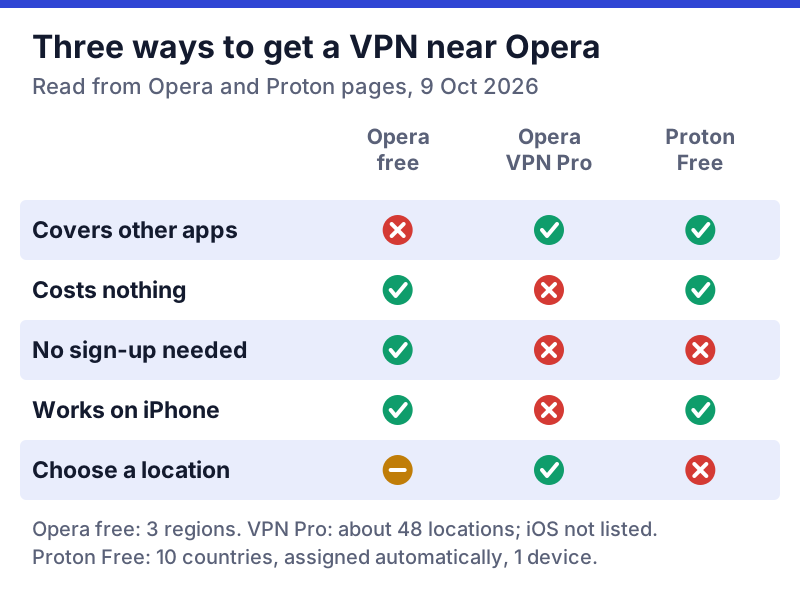
When Opera's free VPN is fine, and when it isn't
It is fine for:
- private browsing on public Wi-Fi when you only need the browser covered;
- keeping websites from seeing your home IP address and rough location;
- a quick change of region between Americas, Europe and Asia, with no account to create.
It is not the right tool for:
- protecting the whole device, including email, messaging and game traffic;
- torrenting or any app outside the browser;
- reaching a specific country's streaming catalogue, since there are only three regions;
- anyone who wants a no-logs claim backed by an audit report they can read themselves.
For whole-device coverage at no cost, our best free VPN guide ranks the safe free apps, led by Proton VPN Free with no data cap.
Fixing 'Opera VPN not working'
When Opera's VPN fails to connect or pages will not load, work through these checks in order. They cover the common causes without needing any special tools.
- Check it is enabled. On desktop, Settings, then Advanced, then Privacy & security, then Enable VPN. The VPN button should show at the left of the address bar.
- Switch region. Click the VPN button and change from the optimal location to Americas, Europe or Asia. A busy or unreachable region is a frequent cause.
- Turn off other VPNs and proxies. A system VPN app, a proxy extension or a work VPN can clash with Opera's. Disable them and retry.
- Try another network. Schools, workplaces and some public Wi-Fi networks block VPN and proxy traffic. If it works on mobile data but not on the Wi-Fi, the network is the cause.
- Update Opera. Install the current version from Opera's menu, then restart the browser.
- Check for a site block. If the VPN connects but one site refuses to load, that site may block VPN and proxy addresses. Turn the VPN off for that site or use another region.
If none of that works, the network you are on may be filtering VPN traffic deliberately. A full VPN app with an obfuscation mode, such as Proton's Stealth protocol, which is included in its free plan, is the next thing to try, within local law.
Edge cases
Opera on phones. The free VPN is built into Opera on iOS and Android as well as on Windows, macOS and Linux. On a phone, remember that it still covers only the Opera app, not your other apps.
Private windows. Opera's help centre says the search-engine bypass option is not supported in Private Mode, and says nothing further about private windows; check the VPN button there before relying on it.
Opera VPN Pro on an iPhone. Opera's page does not list iOS for VPN Pro, so an iPhone needs a different VPN app.
Comparing with a paid VPN's browser extension. Providers like NordVPN sell extensions as companions to their full apps; Opera's free VPN is closer to one of those extensions than to a full VPN app. If you already pay for a VPN, run its app and leave Opera's VPN off to avoid routing traffic twice. If you are choosing a paid VPN for the first time, compare NordVPN's current offer and check the renewal price, $139.08 a year for Basic in the US before tax as of 9 October 2026.
Opera VPN questions
Is Opera VPN a real VPN?
Is Opera VPN safe?
Is Opera VPN free?
How do I turn on Opera VPN?
Why is Opera VPN not working?
Next steps: see the best free VPNs ranked by safety, or run any app you’re weighing through the free VPN safety checklist.