Free VPN for PC (2026): The Safe Ones for Windows 11 and 10, With Real Data Caps
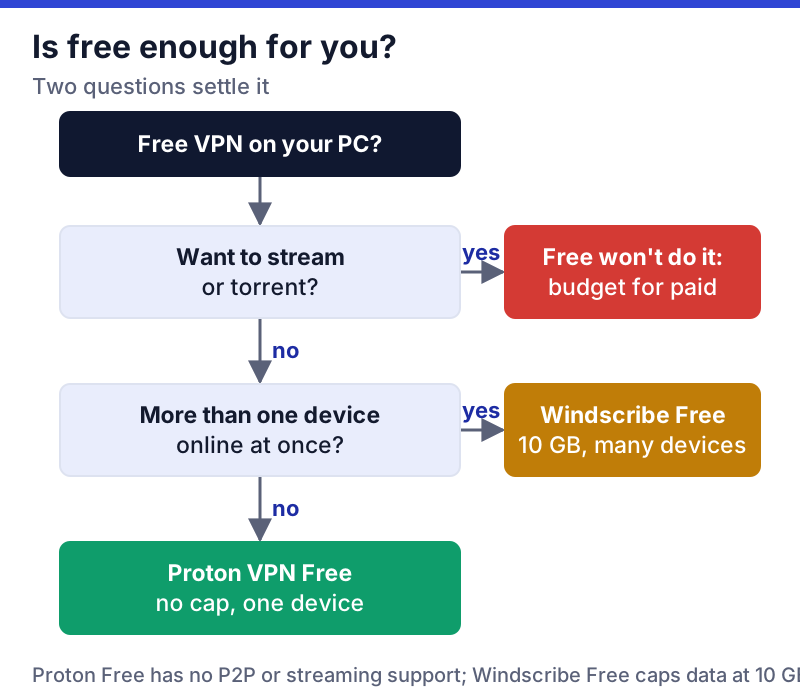
The best free VPN for PC in 2026 is Proton VPN Free: it has no data cap, no ads and no time limit, runs a proper Windows app, and its no-logs policy was checked again by Securitum on site in Zurich in May 2026. The catch: only one device can connect at once, and Proton assigns your server from its 10 free countries. If you need two or more devices connected at once, Windscribe Free is the safe second choice, within 10GB a month.
This guide is about Windows 11 and Windows 10 desktops and laptops. Every cap and limit below was read from the provider's own pages, most recently on 22 October 2026, and we have not run speed tests, so speed is described from what the providers state. Free VPNs from developers you cannot name are not on this list, and the end of the guide explains why.
The safe free VPNs for Windows, ranked by real limits
Four free tiers pass our safety bar on a PC. The ranking puts the one with no data cap and an audited no-logs policy first, then the ones whose caps or paperwork are weaker.
- Proton VPN Free. No data cap, no ads, kill switch and Stealth protocol included, one device, 10 countries assigned automatically. Proton rates the free speed as "medium". Swiss company Proton AG; apps open source.
- Windscribe Free. 10GB a month once you confirm an email (2GB without), and no device limit for personal use. Windscribe Limited, Ontario, Canada. Audited by PacketLabs in 2024 (infrastructure, not a formal no-logs assurance report), and it pays us nothing.
- PrivadoVPN Free. 10GB a month, refreshed every 30 days; its free page describes the plan as "unlimited data and 10GB of uncapped speeds" a month. Its pages disagree on devices: the free page says unlimited, the pricing page says one on a free account. The free page doesn't state how many free locations there are.
- TunnelBear Free. 2GB a month, which TunnelBear's help centre says resets on the monthly anniversary of your account, and since 26 January 2026 free users can no longer pick a country, as TechRadar reported; TunnelBear's pricing page now lists country selection on paid plans only. McAfee bought TunnelBear in 2018.
hide.me also offers a free tier, but we could not read its current terms on 9 October 2026, and press reports disagree on its cap. Check hide.me's own pricing page before relying on it. The full ranking across phones and computers is in our best free VPN guide.
Free-tier cap table (data, servers, devices, audit)
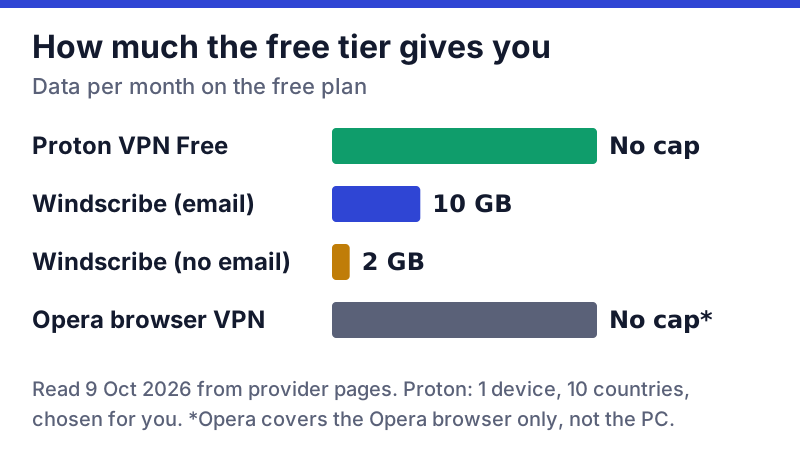
The single number that decides most free VPNs on a PC is the data cap, because desktops do heavy work: video calls, cloud backups and large downloads add up fast. The chart and table below put the caps side by side.
| Free tier | Data | Locations | Devices | No-logs audit |
|---|---|---|---|---|
| Proton VPN Free | No cap | 10 countries, auto | 1 | Yes (Securitum, May 2026) |
| Windscribe Free | 10 GB (2 GB no email) | 10 countries, you pick | Personal devices | Infrastructure audit only (PacketLabs, 2024) |
| PrivadoVPN Free | 10 GB a month | Not stated on its free page | Pages differ (1 or unlimited) | None found |
| TunnelBear Free | 2 GB a month | Auto-assigned | Not stated for Free | Security audits only |
Two details in that table catch people out. Windscribe's 10GB is not free in every sense: its own help article says the extra 8GB comes in exchange for letting it send you one or two promotional emails a month. And Proton's 10 free countries are assigned for you, so you cannot pick, say, a server in your own country to keep local services working.
What 10GB buys on a desktop: enough for a month of web browsing, email and messaging, and not much video. An hour-long HD video call or a single large game update can use a meaningful share of it. If you work from a laptop on public Wi-Fi every day, the uncapped Proton tier is the one that will not run dry in week two.
How safe each free tier is
Safety on a free VPN comes down to who runs it, whether anyone outside the company has checked the no-logs claim, and how the free tier is paid for. All four are freemium: the free tier is paid for by subscribers to the paid plans. Proton states it will never show ads; Windscribe's own trade, by its account, is the promotional email.
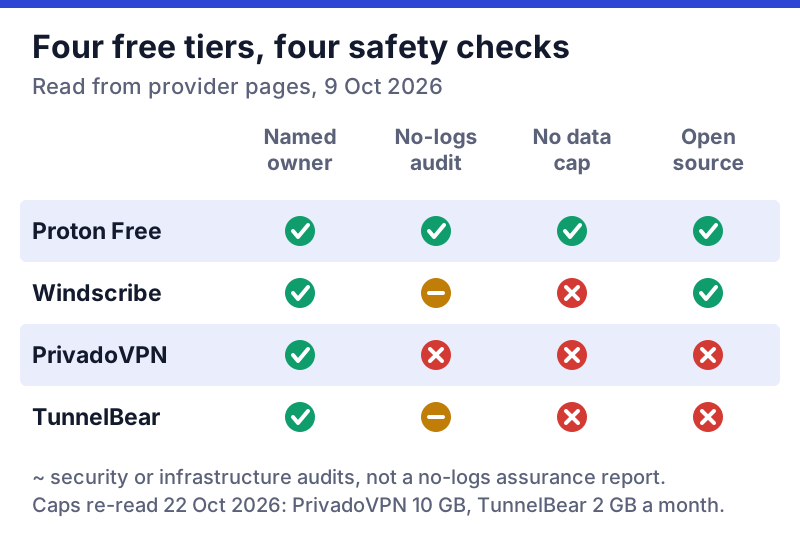
Proton is the only free tier here whose no-logs policy has a recent independent audit: Securitum's fifth consecutive annual check, with Securitum's auditors at Proton AG's Zurich office for the week of 20-27 May 2026. Proton's apps, including the Windows one, are open source. One point that often gets garbled: Proton does not use RAM-only servers. It encrypts server disks with LUKS full-disk encryption and argues that RAM-only offers no extra protection.
In 2024 PacketLabs audited Windscribe's server infrastructure, and Windscribe reports the auditors saw nothing built to undermine its no-logs promise; that is a security audit, not the kind of formal no-logs assurance report Proton commissions, so more of Windscribe's case rests on its own statements and transparency reports. TunnelBear says it runs annual security audits, which test the software for vulnerabilities rather than checking logging. PrivadoVPN publishes no no-logs audit we could find. None of that makes them unsafe; it means you are trusting the company's word more than with Proton.
Windows risks: bundled installers and leftover drivers
Windows adds two risks that phone users rarely face. The first is the installer. Free software on Windows is often distributed through download portals that wrap the real installer in their own, adding toolbars, "optimisers" or adware. A VPN installer that offers to install anything else is a red flag. Download only from the provider's own domain, and if the installer shows an extra offer, cancel and start again from the official site.
The second is what a VPN leaves behind. VPN apps install a virtual network adapter so Windows can route traffic into the tunnel; WireGuard-based apps, for example, use Wintun, the WireGuard project's Windows driver. A clean uninstall removes it, but a crashed or half-finished one can leave an adapter or a startup service behind, which can cause odd connection problems later. After removing a free VPN:
- Open Settings, then Network & internet, then Advanced network settings, and check the list of adapters for one named after the VPN you removed.
- Check Settings, then Apps, then Startup for leftover entries.
- Restart, then confirm your connection works without the VPN before installing a different one.
On Windows 10, the adapter list is under Control Panel, then Network and Sharing Center, then Change adapter settings.
Setting up a free VPN on Windows 11 safely
The whole process takes a few minutes, and four of the steps matter for safety.
- Start at the source. Type the provider's address yourself rather than clicking an ad, and download the Windows app from its own site.
- Make the account. Proton Free and Windscribe Free need an email; neither asks for a payment card. Windscribe gives you 2GB until you confirm the email, and 10GB after.
- Install and allow the network adapter. Windows may ask for permission to install a device driver; that is the virtual adapter, and it is expected from a known provider.
- Turn on the kill switch before your first real session. On Proton it is in Settings; Windscribe calls its version the firewall.
- Check for leaks once. Connect, then visit an IP-check page and confirm it shows the VPN's location, not yours.
A note for Windows 10 users: Microsoft ended support for Windows 10 on 14 October 2025, with paid Extended Security Updates as the stopgap. A VPN encrypts your connection; it does nothing for an operating system that no longer gets security fixes, so keep the PC updated or enrolled in extended updates if you rely on it.
Using a free VPN on a laptop away from home
Most people searching for a free VPN for a laptop want it for one job: public Wi-Fi in hotels, airports, cafés and trains. That is where a free tier earns its keep, and where a few habits make the difference.
Hotel and airport networks usually show a sign-in page before they let you online. A VPN, and especially a kill switch, can block that page from loading, because the laptop is trying to reach the VPN server before the network has let it out. The fix is simple: connect to the Wi-Fi, complete the sign-in page with the VPN off, then switch the VPN on before you open email or banking. If the sign-in page never appears, pause the kill switch for that one step and turn it straight back on.
Data is the other constraint. On a 10GB plan, let Windows updates, cloud-photo syncing and game launchers wait until you are home, or pause them while on the road. Proton's uncapped free tier removes that worry, at the cost of a server you do not choose.
What a free VPN does not do on Windows
A VPN changes who can see your traffic on the way out of your PC. It does not stop malware you download, a phishing page you type a password into, or tracking by sites you are logged into. Keep Windows Security switched on, use a password manager and two-step sign-in, and treat the VPN as one layer, not the whole defence.
Desktop features that actually matter
Three features separate a proper Windows VPN from a weak one. A kill switch blocks traffic if the tunnel drops, which matters on a desktop that stays connected for hours. System-wide coverage means every app is protected, not just one browser; desktop apps do this, browser extensions do not. And DNS-leak protection keeps your domain lookups inside the tunnel.
Proton's free plan keeps both the kill switch and the Stealth protocol, which disguises VPN traffic on networks that block VPNs, such as some offices and campuses. What it leaves out is P2P support and streaming-optimised servers, which are paid-only. That is a deliberate line, and it is the main reason people upgrade.
Browser 'VPN' extensions are not VPNs
A free VPN extension for Chrome or Edge only covers that browser. Your other Windows apps, from Steam and Teams to OneDrive and email clients, keep using your normal connection. Many extensions are proxies rather than full VPNs, and the riskiest free ones collect browsing data: in December 2025 researchers at the security firm Koi Security found that Urban VPN Proxy and three sibling extensions had been capturing users' AI chatbot conversations.
If you want both, use a provider's desktop app for the whole PC and its extension as a companion. Proton and Windscribe both publish extensions from named companies. Our free VPN red flags guide covers how to spot the bad ones.
When a free tier stops being enough
A free tier stops being enough when you need streaming, torrenting, several devices with lots of data, or a server in a specific country. None of the safe free tiers handles streaming reliably; our free VPN for streaming guide explains why.
When you do step up, compare the renewal price, not just the first bill. Proton VPN Plus costs $3.49 a month on a 2-year plan ($83.76 up front) and then renews at $83.88 a year, with 10 devices. Windscribe Pro is a flat $69 a year or $9 a month, and its Build-A-Plan option charges $1 per location a month (minimum $3), each adding 10GB. Surfshark Starter starts at $2.49 a month for 27 months ($67.23) and renews at $79 a year with unlimited devices. All US prices before tax, read 9 October 2026.
Proton is the natural step up if you already use its free tier, because your account carries over: see Proton VPN's plans. If you need every PC and phone in the house covered, Surfshark's plans remove the device limit. Both are affiliate links, disclosed here because they pay us; Windscribe does not, and we recommend it anyway. For the full trade-off, read free vs paid VPN.
Free VPNs to avoid on a PC
Avoid any free Windows VPN whose company you cannot name, whose privacy policy allows selling or sharing browsing data, or whose installer bundles other software. Some well-known names fail those tests in specific, documented ways:
- Hola (free desktop app). Hola's own FAQ, read on 9 October 2026, says free desktop and Android users contribute some of their device's resources to its network, used "for business use by Bright Data", a commercial proxy company. Premium subscribers, and free users of the browser extension alone, are not used as peers.
- Urban VPN Proxy (browser extension). Reported by Koi Security in December 2025 to capture AI chatbot conversations, with the collection running whether or not the VPN was connected.
- Unnamed "free unlimited VPN" apps. If the listing shows no company, no address and no audit, there is no one accountable for what happens to your traffic.
Before installing anything else, run it through our free VPN safety checklist. It takes two minutes.
Edge cases
Work or school laptops. A managed PC may block VPN installs or route traffic through its own VPN. Ask the administrator; installing a personal VPN can break work tools or breach policy.
Gaming PCs. A free VPN adds a hop and is rarely helpful for ping. Some game terms also restrict VPN use, so check before playing through one.
ARM laptops. Windows on ARM PCs can run many x64 apps through emulation, but VPN drivers are low-level software. Check the provider's download page for an ARM64 build before buying a plan to use on one.
Two VPNs at once. Pick one. A VPN app plus a VPN extension, or two apps side by side, compete for routing, and you can end up with neither working properly.
Free VPN for PC questions
What is the best free VPN for PC?
Is there a completely free VPN for Windows with no limits?
Is a free VPN for a laptop safe?
Does Windows 10 or 11 have a free built-in VPN?
How do I remove a free VPN completely from Windows?
Next steps: see the best free VPNs ranked by safety, or run any app you’re weighing through the free VPN safety checklist.