Free VPN for Mac (2026): The Free Tiers That Have Real macOS Apps
The best free VPN for Mac is Proton VPN Free: a native macOS app with no data cap, no ads and an independently audited no-logs policy, at the cost of one device and a server country picked for you. Windscribe Free is the alternative when you want to choose a location or connect a MacBook and an iPhone at the same time, within 10GB a month once you confirm an email.
If you already pay for iCloud+, you also have iCloud Private Relay, which is useful but is not a VPN. This page explains where it stops, which free Mac VPNs to trust, and which to skip. Every limit below was read from the provider's or Apple's own pages on 9 October 2026; we did not run speed tests.
The free VPNs with genuine macOS apps
A "genuine" Mac VPN here means a native app from a named company that covers the whole Mac, not just one browser, and is funded by a paid plan rather than by your data. Two free tiers meet that bar without caveats.
Proton VPN Free comes as a DMG from protonvpn.com rather than through the Mac App Store. Proton sets no data or time limit on the free plan and shows no ads; it connects one device at a time to servers in 10 countries that Proton assigns, and includes the kill switch and the Stealth protocol for networks that block VPNs. Proton rates its free speed as "medium". Every Proton app is open source, and Securitum has now audited the no-logs policy five years running, most recently with a visit to Proton's Zurich office in late May 2026. Our Proton VPN free review covers it in full.
Windscribe Free is also a direct download. Windscribe builds its macOS app for both Intel and M-series chips, so it needs no Rosetta translation on Apple Silicon. Its firewall blocks traffic outside the tunnel and fails closed, and the app offers per-app split tunnelling plus a choice of WireGuard, IKEv2, OpenVPN and two stealth modes. The catch is the allowance: 10GB a month after you confirm an email address, 2GB if you do not. Windscribe runs no affiliate programme, so recommending it earns us nothing.
Other freemium names have Mac apps too, including PrivadoVPN and TunnelBear, but we could not confirm their current free allowances from a US read on 9 October 2026, so we leave them out of the table rather than print a figure that may be wrong.
Free-tier table for Mac (cap, servers, how you install it)
| Option | Covers | Data | Locations | Install |
|---|---|---|---|---|
| Proton VPN Free | Whole Mac | No cap | 10 countries, assigned | DMG from protonvpn.com |
| Windscribe Free | Whole Mac | 10 GB (2 GB no email) | About 10 countries | Direct download |
| Opera browser VPN | Opera browser only | No cap | 3 regions | Built into Opera |
| iCloud Private Relay | Safari, DNS, http traffic | No cap | Your region only | Needs paid iCloud+ |
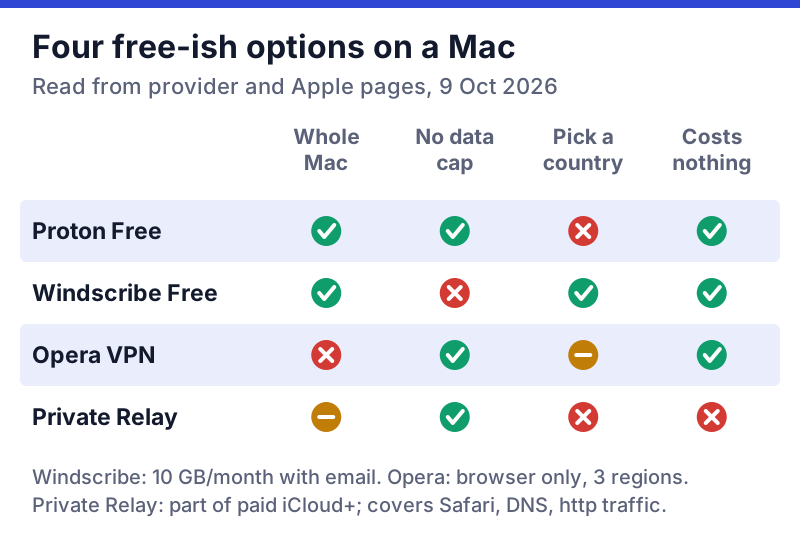
The pattern is simple once it is laid out. Proton gives you the most data and the strongest audit trail but no say over location. Windscribe gives you location choice and several devices but a monthly meter. Opera's free VPN is genuinely unlimited but lives inside one browser, and Private Relay is part of a subscription you may already have, with coverage gaps covered in the next section.
One thing none of them does well is streaming. Proton reserves streaming support for paid plans, and 10GB on Windscribe is a few hours of HD video. Our free VPN for streaming guide explains why free tiers struggle there.
Proton Free or Windscribe Free: which suits your Mac?
The two recommended tiers solve different problems, so the right one depends on how you use the Mac.
Choose Proton VPN Free if your MacBook is your main computer and you want it protected all day without watching a meter. Video calls, cloud backups to iCloud or Dropbox, and large downloads all run through the tunnel without eating into an allowance. The trade is control: you cannot pick a country, and only one device can be connected, so your iPhone goes unprotected while the Mac is on.
Choose Windscribe Free if you need two things Proton's free plan will not give you: a server in a particular country, or a Mac and a phone connected at once. It suits occasional use, such as a coffee-shop session or a hotel stay, better than all-day use, because 10GB runs out quickly once video or backups join in. Split tunnelling helps here: send only the apps that need protecting through Windscribe and let bulk traffic go direct.
Use both if you want the best of each. Nothing stops you installing both apps and running whichever fits the moment; just connect one at a time. Many readers keep Proton as the everyday default and Windscribe for the days they need a specific location.
Neither is the right tool if you mainly want to stream from another country's catalogue. That is a paid-plan job, and even paid VPNs do not promise it will work.
iCloud Private Relay: free with iCloud+, but not a VPN
Private Relay is Apple's two-hop relay for Safari, and it is a good privacy tool for what it covers. According to Apple's technical overview, it protects all Safari browsing, the DNS lookups your Mac makes, and unencrypted (http://) traffic from other apps. It does not touch the encrypted traffic that most apps and other browsers, such as Chrome and Firefox, send. It comes with any iCloud+ plan, so it is not free in the strict sense.
It also cannot do two things people often want a VPN for. It will not make you appear in another country; Apple keeps your IP address mapped to your region. And it switches itself off in countries and regions where Apple does not offer it, without listing them on its support pages.
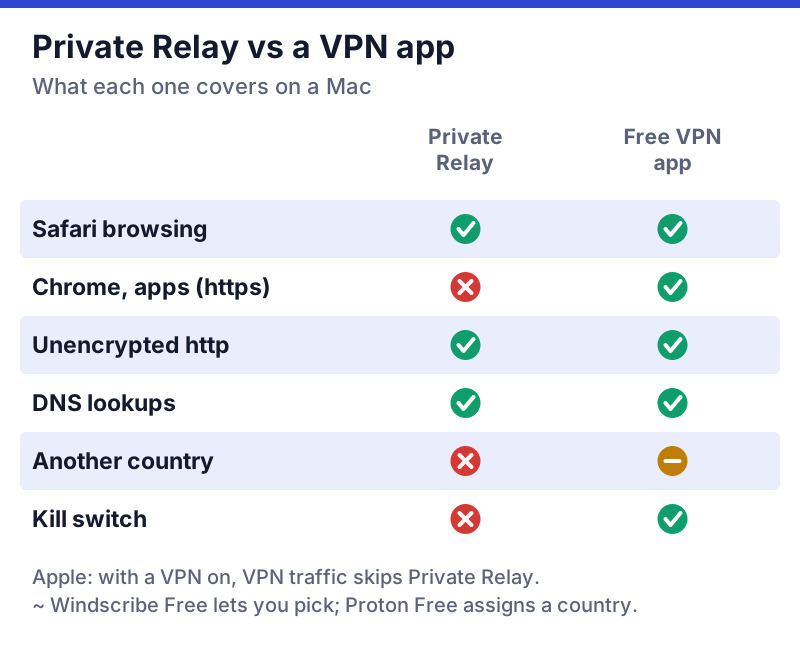
Can you run both? Not on the same traffic. Per Apple, anything routed through an active VPN skips Private Relay entirely. Apple's Mac help goes further: VPN and content-filtering apps can clash with Relay, and its advice is to switch the other app off if you want Relay working. The practical answer for most Mac owners: leave Private Relay on for everyday Safari use, and switch to a free VPN app when you are on hotel or café Wi-Fi, when you use other browsers or apps, or when you need the kill switch.
Installing a free VPN on a Mac safely
Getting a free VPN running on a Mac takes about five minutes. Most of the safety comes from where you download it and what you approve.
- Download from the provider's own site. Type protonvpn.com or windscribe.com yourself; ignore ads and "download" mirror sites.
- Create the account. Both need an email address and no payment card. For Windscribe, confirm the email to unlock 10GB.
- Approve the system prompts. macOS will ask to add a VPN configuration, and newer versions ask you to allow a network extension. On Sequoia (macOS 15) or newer, look for the Network Extensions list inside the Login Items & Extensions pane of System Settings.
- Check the kill switch. On Proton, turn it on in the app's settings. Windscribe's firewall does the same job.
- Run one test. Connect, load an IP-check page, and confirm it shows the VPN's location before you rely on it.
Two common snags. If the app says it is connected but nothing loads, an unapproved network extension is the usual cause; go back to step 3. And if you also run a work VPN or another VPN app, quit it first: macOS runs one VPN tunnel at a time.
When the free tier stops being enough on a Mac
You will outgrow a free Mac VPN when you need streaming, P2P, more than one device on Proton, or more than 10GB on Windscribe. The step-up is usually within the same provider, so your account and app stay the same.
- Proton VPN Plus: on the 2-year plan, $3.49 a month ($83.76 up front), then $83.88 a year at renewal, with 10 devices. It is the natural upgrade from Proton Free; see Proton VPN's plans.
- Windscribe Pro: a flat $69 a year or $9 a month, or Build-A-Plan at $1 per location a month (minimum $3), each adding 10GB.
- NordVPN Basic: in the US, $139.08 a year once the first term ends; its Mac apps come in website and App Store builds with different features. If you want the broadest paid feature set, check NordVPN's current offer and confirm the first-term price at checkout.
Those are US prices before tax, checked on 9 October 2026; the Proton and NordVPN links pay us a commission. Windscribe pays us nothing. For a broader look at the trade, read free vs paid VPN.
Free Mac VPNs to avoid
Skip any free Mac VPN that fails one of these tests: no named company with an address, no paid plan or other visible way of paying for its servers, a privacy policy that allows sharing your browsing with partners, or an installer that offers extra software. Unlimited free data from an unknown developer is the classic warning sign, because someone pays for those servers.
The iPhone App Store, whose apps can also run on Apple Silicon Macs, has had documented problems. A Tech Transparency Project investigation published in April 2025 found that 20 of the top 100 free VPN apps on the US App Store were Chinese-owned without making that clear, several of them tied to Qihoo 360, which the US Commerce Department sanctioned in 2020. Our guide to Chinese-owned free VPNs goes through that report.
Browser extensions are a separate trap: a free VPN extension in Chrome on your Mac covers only Chrome. Before installing anything you have not heard of, run it through our free VPN red flags list.
Edge cases on a Mac
Work-managed MacBooks. A company-managed Mac can refuse new network extensions, and it may send everything through the employer's own VPN already. Ask before installing.
Older macOS versions. Providers drop support for old macOS releases over time, and an old app version gets fewer fixes. If your Mac cannot run a recent macOS, a VPN will not make it safe to use for sensitive work.
Travelling with Private Relay. Abroad, Private Relay can switch off wherever Apple has not launched it, and some networks block it outright. A free VPN app with Stealth (Proton) or stealth modes (Windscribe) is the fallback, within local law.
Opera on a Mac. Opera's free VPN encrypts traffic between the browser and Opera's servers in the US, Singapore or the Netherlands, with no cap and no sign-up. It is handy for occasional private browsing, but it covers only Opera, and Opera Ltd is about 68% owned by Chinese company Kunlun Tech, per its 2025 annual report.
Free Mac VPN questions
What is the best free VPN for Mac?
Is iCloud Private Relay a free VPN?
Is there a free VPN for MacBook with unlimited data?
Do free Mac VPNs work on Apple Silicon?
Can I use Private Relay and a free VPN at the same time?
Next steps: see the best free VPNs ranked by safety, or run any app you’re weighing through the free VPN safety checklist.